Time you can see
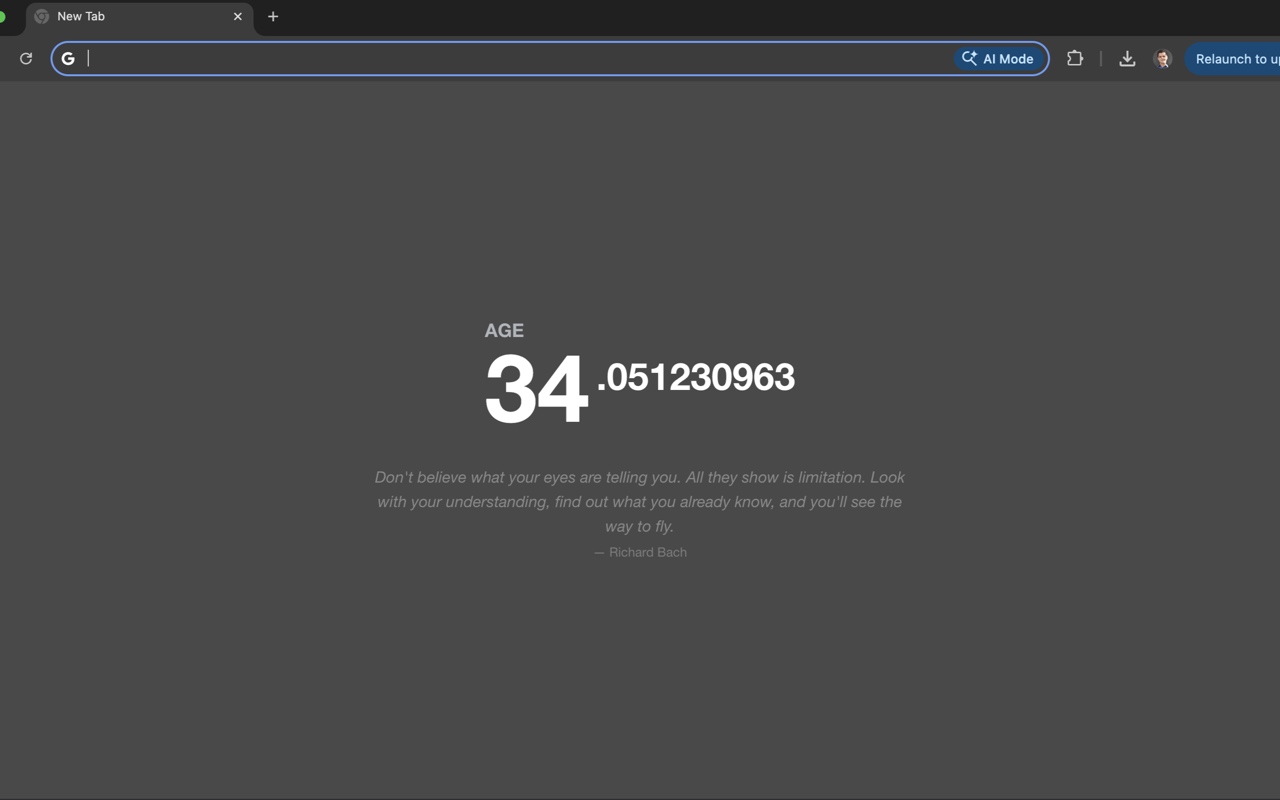
You open dozens of new tabs a day, and each one is a blank page you look at for a second. Motivation Counter puts a single number there: your age with the decimals running, or the time left until a deadline.
It doesn’t block sites, send notifications or keep score. It just makes time visible, which is often enough to close the feed and get back to what you opened the browser for.
What people use it for
A deadline that stays in view
A launch, an exam, a trip. Set the date and, if it matters, the time: a deadline at 6:30 PM counts down to 6:30 PM, not to midnight.
The year in perspective
“Until end of year” shows how much of the year is left. A sober number in October, a push in December.
A quiet memento mori
Your age as 34.123456789 years, the last digits always moving. The idea goes back to Alex MacCaw’s 2013 extension; this is a fresh take with more modes.
A calmer new tab
No news feed, no grid of shortcuts, no ads. A number, an optional quote and an optional search bar.
Features
Three counter modes
Age counter, until the end of the year, or until any date you choose. Everything updates in real time.
Down to the time of day
Turn on “Set time” for the countdown target or your date of birth when the hour matters. Leave it off and dates work as usual.
A quote a day
A new quote each day from a collection of over 1,500. It stays the same all day, changes at your local midnight, and can be turned off.
Optional search bar
Search from the new tab with Google, DuckDuckGo, Bing, Yandex, Yahoo or Brave, in the same tab or a new one. Off by default.
Make it yours
Six palettes (three light, three dark) or follow the system theme, Sans, Serif or Mono type, and three counter sizes.
A small tally
Settings show how many new tabs you have opened with the extension. Click the version number next to it to see what changed in recent releases.
How it works
- Install it from the Chrome Web StoreIf Chrome asks whether to keep the new tab page it changed, choose to keep it.
- Open a new tab and click the gearIt sits in the bottom-right corner and opens the settings.
- Pick a mode and enter a dateYour date of birth for the age counter, or the target date for a countdown. The counter starts right away.
Questions
Does my date of birth go anywhere?
No. It is stored in your browser’s local storage on this device. The extension makes no network requests, needs no special permissions and works offline. See the privacy policy.
How do I get the normal new tab back?
Turn the extension off or remove it on chrome://extensions.
Does the search bar track what I search?
No. It simply opens the search engine you picked with your query; the extension does not see or relay the traffic.
Is it free?
Yes, free and open source under the MIT license. The code is on GitHub.